Management OS and Backstory: the same deals, plus your own week.
Backstory, formerly People.ai, reads every email, meeting and call and answers deal questions for CROs and VPs of Sales. Management OS reads the same kinds of data and puts your deals, your team's coaching and your own week in one brief, for the leader.
Card required. Cancel before day 30 and pay nothing.
- Runs side by side
- Read-only to your CRM
- From $1,000 a month, published
What is Backstory for?
Backstory calls itself a revenue intelligence platform. It reads every email, meeting and call and gives revenue leaders a direct answer on every deal, where they work.
Every interaction, matched to the deal
Backstory captures email, meetings and calls automatically and matches them to the right accounts, opportunities and contacts, across more than one CRM.
Answers where you work
In Claude, ChatGPT, Copilot or Slack through its MCP server (the standard way AI tools connect to other software), with each answer built once so the same question returns the same answer.
Qualification and coaching
MEDDPICC scoring in seconds, with every line backed by a real meeting or email, plus an AI sales coach and risk headlines.
From backstory.ai and its FAQ, read 3 November 2026. Backstory says more than 100,000 sellers use it.
How do Management OS and Backstory compare?
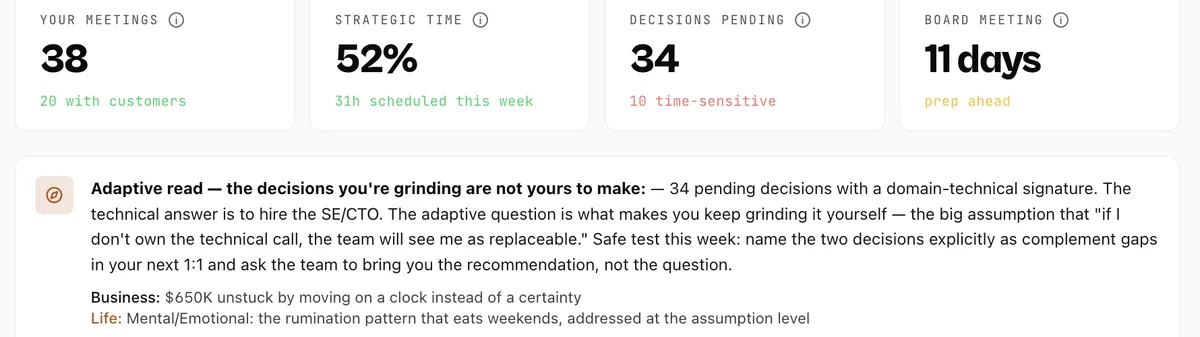
Both read a team's email, meetings, calls and CRM, and both help you coach from what they find. Management OS also starts from your own week: where your hours went and the decisions waiting on you, in the same brief as the deals and the coaching.
| Feature | Backstory | Management OS |
|---|---|---|
| Works from | Email, meetings, calls and CRM records, from Salesforce, Microsoft Dynamics or Oracle, plus Gmail, Outlook, Zoom, Teams and Slack | Your CRM or a spreadsheet, calendar, email and recorded calls (52 integrations). Not yet: Microsoft Dynamics 365 and Teams. |
| Coaching | An AI sales coach, coaching built on your won deals, and which rep needs attention | Who needs coaching this week and why, from the evidence on their deals, the likely cause, and the words to use in the 1:1 |
| 1:1s | 1:1 coaching tailored with real-time relationship and engagement metrics | A prep brief 30 minutes before every 1:1, and a nudge when a direct report goes 14 days without one |
| What it hands the leader | The few moves that change your number, each sourced to the meeting, the stakeholder and the dollars at stake | Your move, with the email or the 1:1 outline drafted. You decide what goes out. |
| Your own week | Not described on its home page | Where your hours went against the target for your role, and the decisions waiting on you |
| Getting started | “Most teams are live in 2–4 weeks”, with two years of deal history analyzed on day one (its FAQ) | Connect your CRM in about 5 minutes. Your first brief lands in about 15 minutes. A leader can start alone on a 30-day trial. |
| Pricing | On its pricing page, which describes pricing built around what your team uses | Published packages, priced by the people you manage, from $1,000 a month billed yearly |
6 more rows: built for, deal answers, forecast, accounts, how you check it, where you use it
| Feature | Backstory | Management OS |
|---|---|---|
| Built for | CROs and VPs of Sales who own the number and answer to the board | The leader carrying the number, from a founder to a CRO, and the managers, reps and customer success managers they lead |
| Deal answers | Deal summaries, engagement scoring (how engaged each buyer is), risk headlines, and MEDDPICC scoring (a common checklist for qualifying a deal) backed by meetings and emails | Each deal checked on 15 things a buyer must confirm (the pain, who signs, the deadline), with the next move |
| Forecast | Forecasting and waterfall charts, stage by stage, with every status traced to the activity behind it | A forecast snapshot by category in the daily brief, and Forecast Call Prep on Sunday at 9pm: what to commit, what to defend, what to walk back and what not to discuss |
| Accounts | Automated account plans, parent-account roll-ups and stakeholder maps | An executive brief per account and a one-pager before each meeting, with every attendee's likely buying role |
| How you check it | Every status traces back to the activity behind it | Every item carries “Why am I seeing this?”, which explains the signal behind it |
| Where you use it | Backstory's web app, your CRM, and Claude, ChatGPT, Gemini, Copilot or Slack | The Management OS app, email, Slack and WhatsApp, and inside Claude, ChatGPT, Grok and Gemini |
How we wrote this page: Management OS wrote it. We describe Backstory only from its own public pages, read on 3 November 2026, and quote or closely paraphrase them. Where those pages don't describe something, the table says so rather than guess. We have not tested the two products head to head. Sources: Backstory home page and FAQ, Backstory pricing. Backstory and People.ai are trademarks of their respective owners.
After the deal answer: who needs coaching, and what kind.
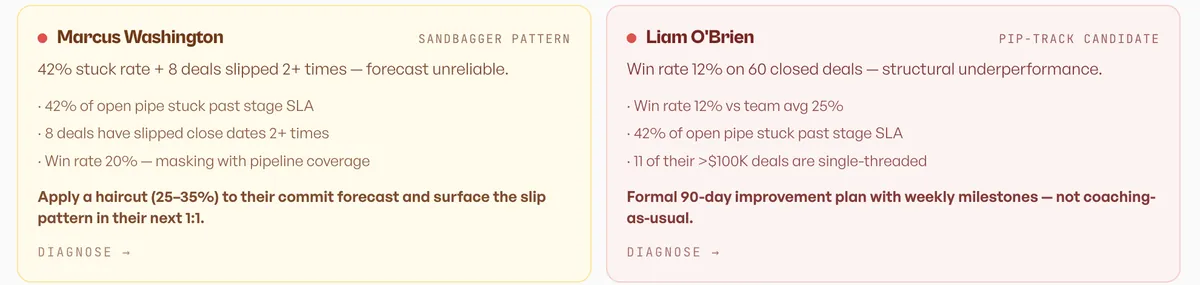
The coaching view in the demo workspace: two reps in focus, Marcus and Liam, each with the evidence from their own deals and the move.
- Signal
Marcus Washington: a sandbagger pattern. Liam O'Brien: a PIP-track candidate.
- Evidence
Marcus: 42% of open pipeline stuck past its stage deadline and 8 deals slipped twice or more. Liam: a 12% win rate on 60 closed deals, against 25% for the team.
- Interpretation
Marcus's forecast can't be trusted as called. Liam's gap is structural, not a bad month.
- The move
Haircut Marcus's commit by 25 to 35% and raise the slips in his next 1:1. Put Liam on a 90-day plan with weekly milestones.
Screens are from the live product running on our demo workspace, Cipher Atlas: a fictional security-software company. Its CRM uses real company names as accounts; the deals, contacts and reps are sample data, and none of those companies is a Management OS customer.
Can you run Management OS and Backstory together?
Yes, side by side. Management OS doesn't connect to Backstory. Both read your CRM, email and calendar, so neither needs the other and nothing has to move.
Keep Backstory
For deal answers across the org.
Connect your CRM
Read-only, in about 5 minutes.
Read your first brief
In about 15 minutes: your deals, your team's coaching and your own week.
Which one does a revenue leader need?
Backstory is the closest of the three. If you need consistent deal answers across a large org and several CRMs, Backstory. If you need one brief for your deals, your team and your own week, Management OS.
Choose Backstory
Backstory fits a sales organization with complex deals, more than one CRM (including Microsoft Dynamics or Oracle) and a need for consistent answers across many users.
Choose Management OS
Management OS fits the leader's seat, from a founder still carrying the number to a CRO. One brief covers the deals, the team and your own week, priced by the people you manage, and a leader can start alone, with a first brief in about 15 minutes.
Or run them side by side. Both read the same CRM, email and calendar, so a team can keep Backstory for org-wide deal answers and give the leader Management OS for the week.
See the product, no login · Talk to Jason about running both
The method came first. The software runs it every week.
The sales management operating system built for leaders and used by their teams: insights, coaching and actions to develop yourself, your team and your business. Jason Mesiarik spent twenty years leading revenue teams and training the people who run them; Management OS runs the operating rhythm he used, on your own data, every week.

Jason Mesiarik
Founder. Why he built it
Results Jason led as an operator, using the method Management OS now runs. They are his results, not Management OS customer results.
Read-only, and yours.
You grant access, we read. What we store, where, and who processes it is published.
- CRM accessRead-only to your CRM. Management OS never creates, changes or deletes a CRM record.
- Where it writesIt writes only where you deliver your work: briefs and alerts to the Slack channels or Notion page you choose, a Doc you export to Google Drive, and the webhook it registers with a tool you connect so new records reach it.
- No training on customer dataWe do not use Customer Data, prompts, or AI Output to train, fine-tune, or improve any AI model, including our own.
- EncryptionEncrypted in transit and at rest.
- Where it runsRuns in the United States on Vercel and Supabase.
- AssuranceSOC 2 Type I is targeted for Q1 2027. An independent penetration test is planned. None has been performed yet, and we will say so until one has.
Questions about Management OS and Backstory
Do I need Management OS if I use People.ai?
People.ai is now Backstory, and the two overlap: both read a team's email, meetings, calls and CRM and answer what is happening on each deal. Management OS puts the deals, the team's coaching and the leader's own week in one brief for the leader. The quickest way to decide is to run Management OS on your own pipeline for 30 days. Card required. Cancel before day 30 and pay nothing.
We're a five-person team on HubSpot. Which fits?
Team: you and up to 5 people, $18,000 a year, or $1,800 a month billed monthly. HubSpot connects in about 5 minutes, and a leader can start alone. The first 30 days are free. Card required. Cancel before day 30 and pay nothing.
Does Management OS work with Microsoft Dynamics?
Not yet. Microsoft Dynamics 365 is on the coming-soon list on the integrations page; if it decides your evaluation, tell Jason. Today Management OS connects to HubSpot, Salesforce, Pipedrive, Zoho CRM, Keap, SugarCRM, Attio and monday.com, or reads a spreadsheet.
How much does Management OS cost?
Packages are published and priced by the people you manage: $12,000 a year for a leader and up to 3 people, $18,000 for up to 5, and $30,000 for an executive and up to 10 people across managers and reps. Paying monthly costs more. The first 30 days are free. Card required. Cancel before day 30 and pay nothing.
Does Management OS change records in my CRM?
No. Read-only to your CRM. Management OS never creates, changes or deletes a CRM record.
Is my data used to train AI models?
No. We do not use Customer Data, prompts, or AI Output to train, fine-tune, or improve any AI model, including our own.
Three ways in. Your call.
See it first
Real screens from the live product. No login.
See the product 15 minutesTry it on your own data
Connect your CRM read-only in about 5 minutes. Your first brief lands in about 15 minutes.
Try it free for 30 daysCard required. Cancel before day 30 and pay nothing. 30 minutesTalk to Jason
Bring your team, your CRM and your hardest week.
Book 30 minutesOn day 30 the trial becomes the package and billing you chose at sign-up, unless you cancel: from $1,000 a month billed yearly, or $1,250 billed monthly. See every package.